

FixingbentCPUpinsmeanspreppingforsurgery
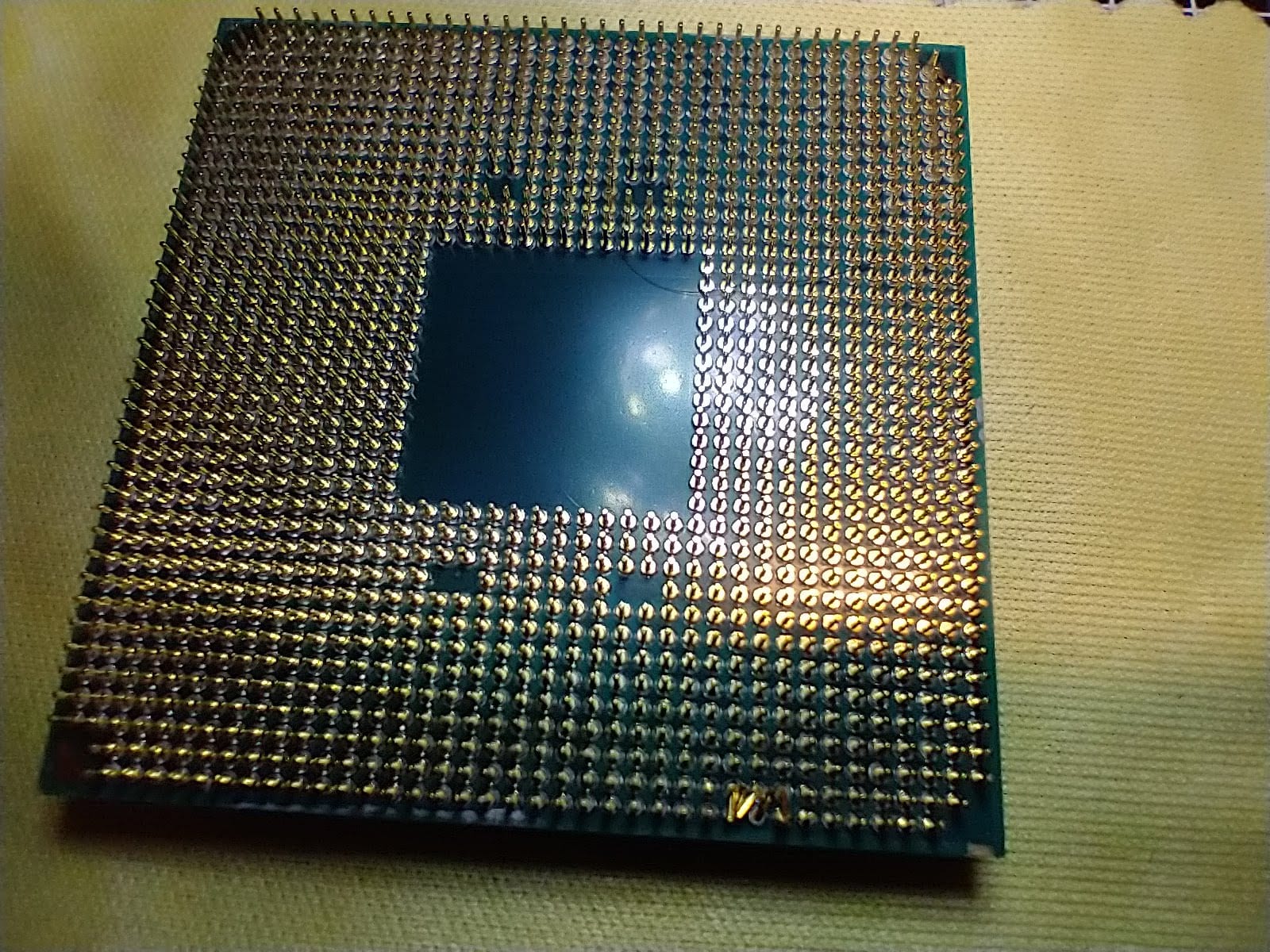
I recently had a customer who had just built his own PC, an AMD Ryzen, but could not get it to boot. So, he brought it to me to figure out what was going wrong. After examining things, checking out things like the power supply, RAM, etc., I decided to pull out the CPU, and discovered what you see in the image above.
Fixing bent CPU pins is one of the most delicate things you can do to repair a PC, aside from microsoldering. Careful doesn't begin to describe the mindset here. You need to approach this like you're prepping for surgery. Be patient, and always know where your hands are, and what they're trying to do. One false move, and a pin could snap, and that's the end of that CPU, since bent or snapped pins are not covered in the warranty.
As with microsoldering, one piece of equipment makes this repair possible: a digital microscope. The image above was taken using macro mode of my smartphone. But with the microscope I can see every pin.
To be sure, I'm not using a top-quality stereo microscope that costs hundreds of dollars. Instead, I'm using an inexpensive, generic USB microscope from Amazon, one that was about $35. I can't recommend any one in particular, since all of them are very similar, so your mileage may vary. But the stand that comes with any of these microscopes is just atrocious. Ditch it, and get a universal $20 stand instead. With that, I can precisely control the height of the lens via a knob. Combined with the focus knob of the microscope, I can really get a terrific and stable picture that's great for this kind of work.
I display this picture on a 22-inch monitor right in my sightline, and work by looking at the monitor, not my hands. Using some soldering assist tools, or "pokey things" as I tend to call them, along with the tip of a 0.5mm mechanical pencil (a great tool for this job), I carefully bent the pins back to a vertical-ish alignment. You never want to apply any force other than a slight sideways motion.
Then I reinserted the CPU back in its socket, where it locked in correctly, and booted up. This was maybe the 15th or 20th case of bent pins I've seen over the years. Just remember, an AMD CPU should sit flush in the socket. If you see it not sitting flush, that means a pin is bent. Don't force it.
And if you're a novice builder, I would not recommend doing this repair yourself. That's what we're here for.